
Reading the Performance tab
How your reps are moving leads: four numbers, a throughput chart, a funnel per rep, what changed this week, and every lead that has gone quiet.
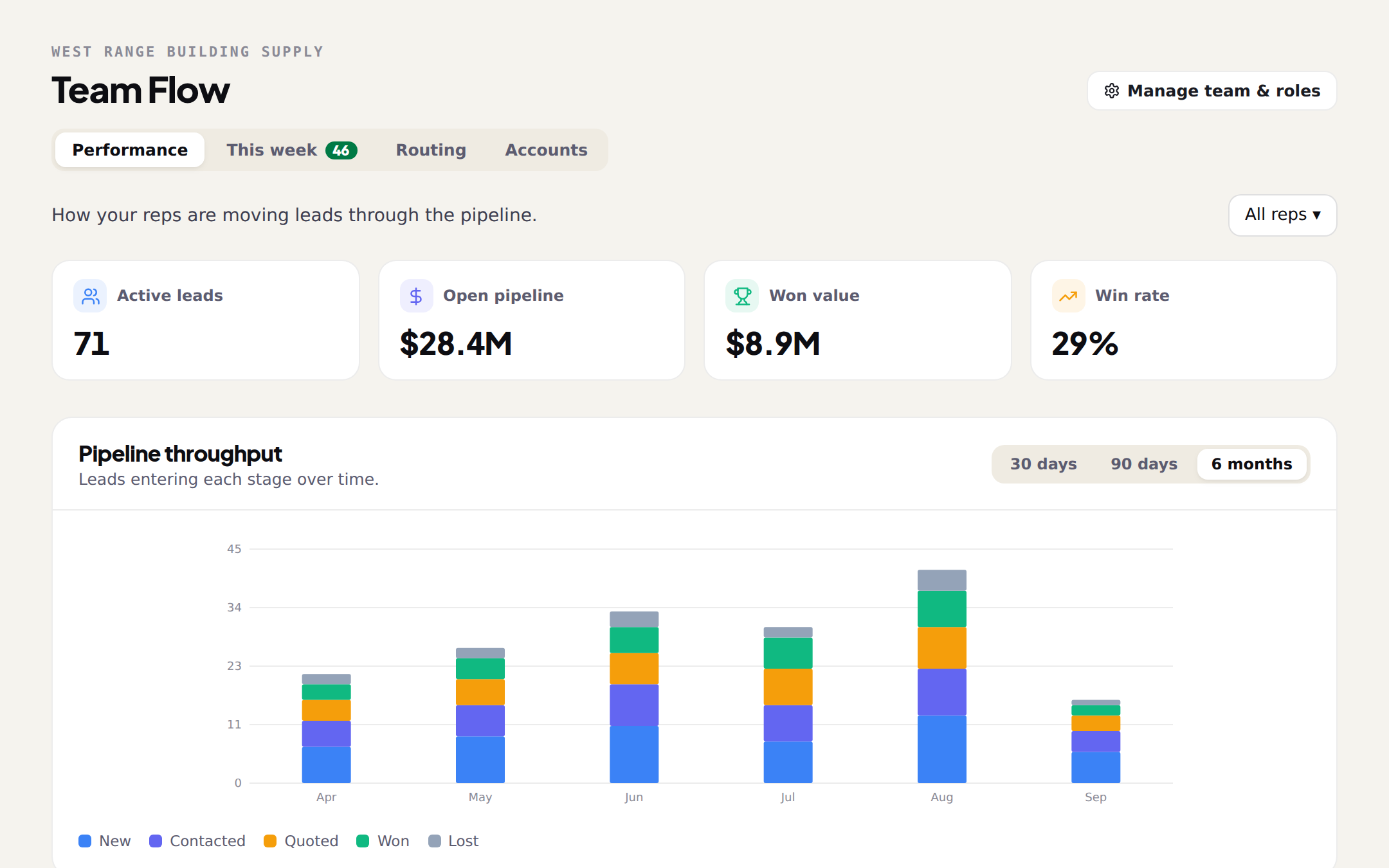
The four numbers
Active leads, Open pipeline (the value of everything not yet won or lost), Won value, and Win rate. A rep filter at the top right narrows all of it to one person. These are the branch's numbers, not the market's; the market is on the Territory page.
Throughput and the funnel
Pipeline throughput is leads entering each stage over time (New, Contacted, Quoted, Won, Lost), by day, week, month or year. A month where New grows and Contacted does not is a month the leads were assigned and not called. By rep puts each rep's funnel, active count, wins, win rate and won value side by side, which is the honest version of the question every manager asks.
What changed this week, and what went quiet
What changed this week counts saves, stage moves, wins, notes, assignments and emails. Stale leads lists every active lead untouched for 14 or more days, with the rep, the stage and how long it has sat, so you can nudge or reassign. The tab also nudges you: when a Monday import is waiting, it says how many new permits are waiting to be routed and takes you to This week.