
How a week runs on BuildMapper
The whole loop in one read: permits land Monday, you route them, Scout works them with each rep, the pipeline and the quote keep themselves current, and every won job teaches next Monday's list.
Every other guide here explains one part of the week. This one is the shape of the whole thing, so you can see where your part sits and what happens either side of it. Read it once — you should not need it again.
The short version: new permits land on Monday, a manager decides who works each one, Scout works them with the rep, the pipeline and the quote keep themselves current, and what you win teaches next Monday's list. Nobody re-types anything that already happened.
The eight moves
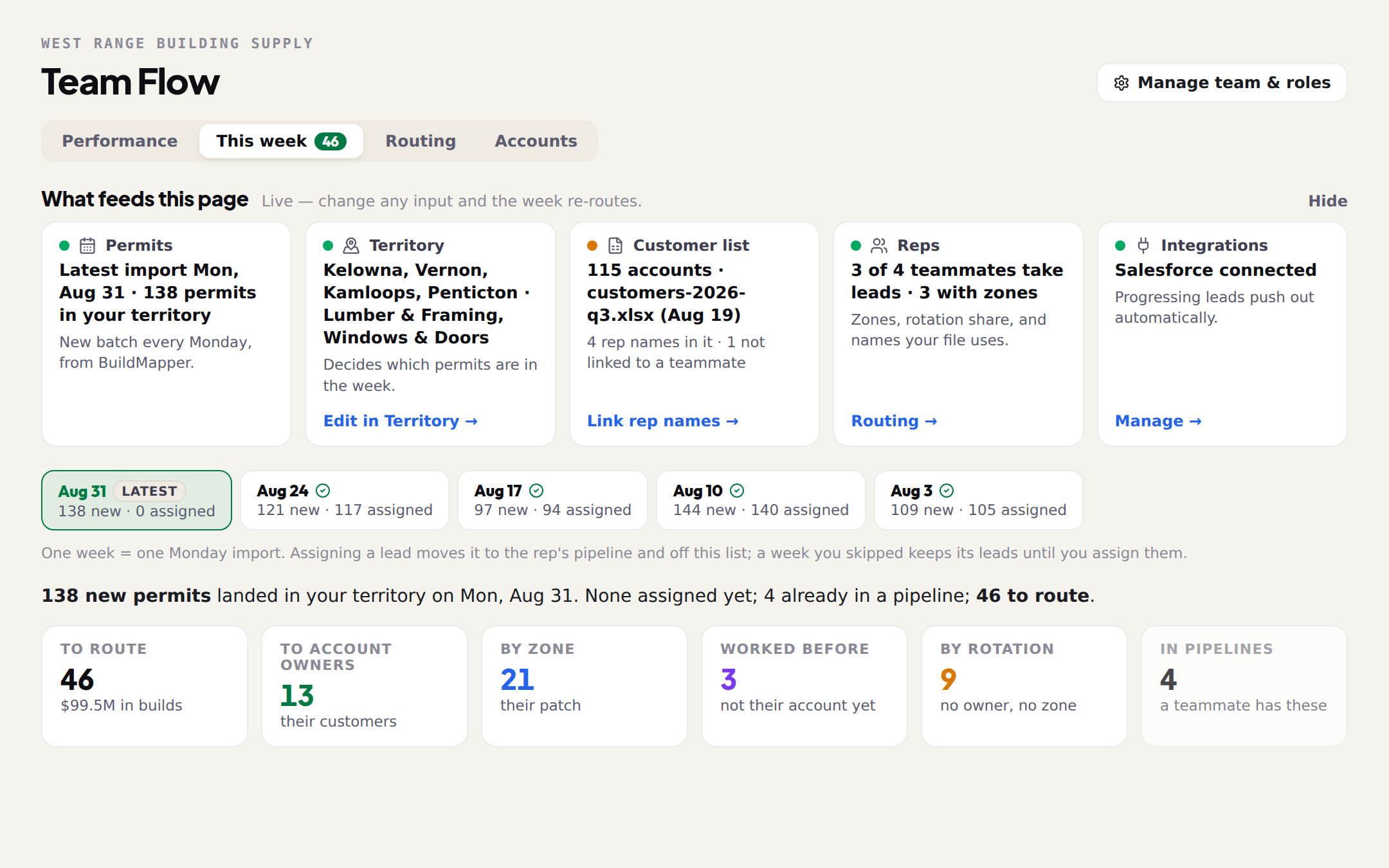
- 1New permits landEvery new permit inside your territory arrives on the This week tab of Team Flow at once, already matched to a builder, a project type, an address and a build value. Nobody exports a list or checks a city portal.
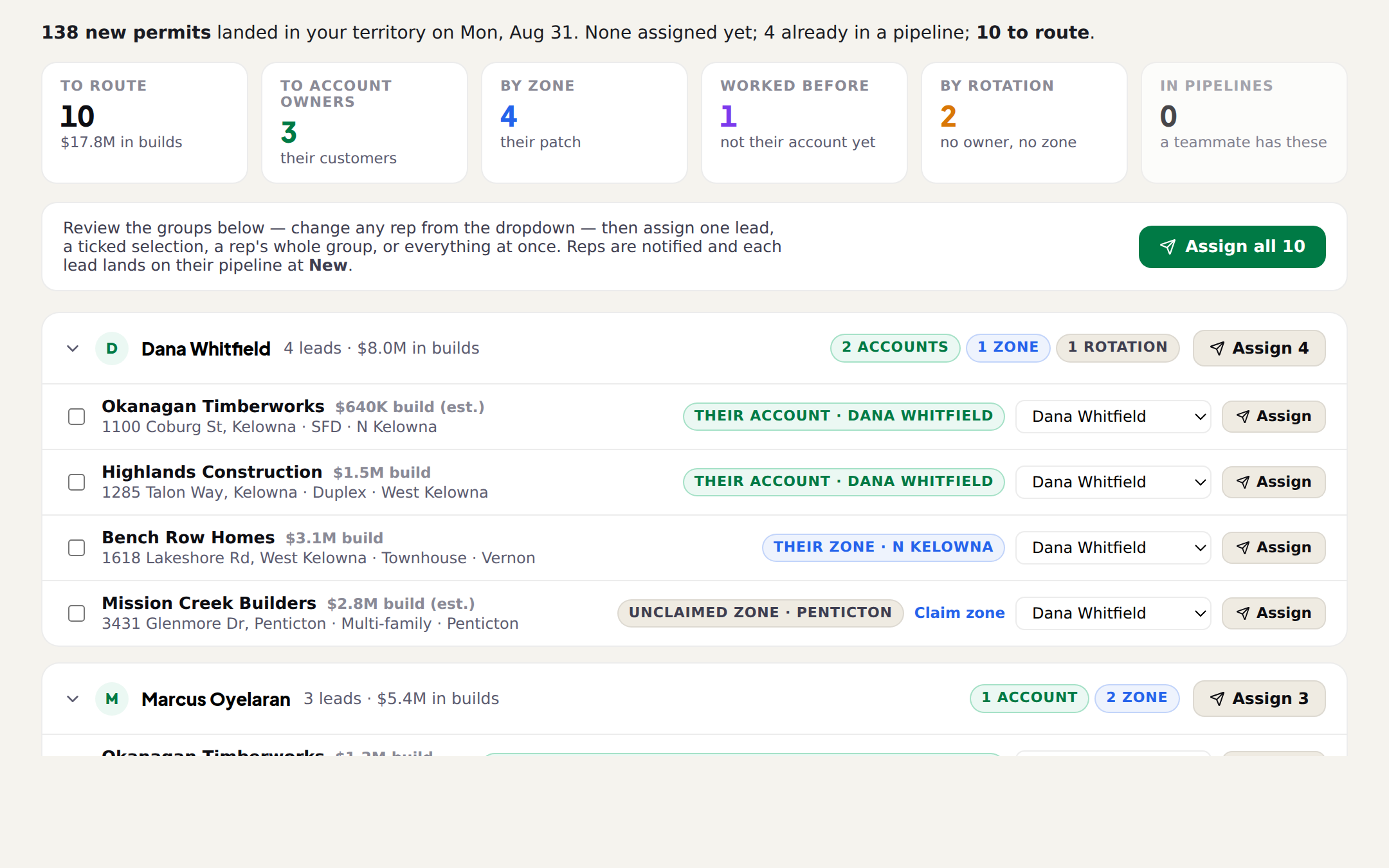
- 2You route and assign — or the rep goes huntingEach permit is checked against your customer list first: if the builder already buys from you, the lead goes to the rep who owns that account. The rest route by the rep your file names, by who has worked that builder before, by zone, then by rotation. Every row shows which rule picked its rep, and nothing reaches anyone until you assign. Reps do not have to wait to be handed anything, either: Project Data is the map of every permit in their area, scored for what they sell and one tap from their own pipeline, Connections tells them first when a builder they follow pulls, and Scout will simply find them on request — ask for new multi-family over a certain size and send back what comes. A branch with nobody routing runs the loop entirely that way.
- 3The rep is toldThe lead lands on that rep's own pipeline at New and Scout tells them — in the app, and by text if they have Scout on their phone. The brief is ordered, so they know who to call first and why. A lead the rep found for themselves arrives on the same board, at the same stage.
- 4The rep works itScout researches the builder, finds the right contact, drafts the email for that project, logs the calls and notes, and books the follow-up. The rep decides what actually goes out.
- 5The pipeline keeps itself currentAn email sent moves the card to Contacted. A quote sent moves it to Quoted and carries the value. A signed contract marks it Won. The manager is reading the same card the rep is working, not a copy of it.
- 6The quote comes from your own catalogAt the quoting stage the rep describes the job or drops in the plans; Product Brain reads them, does the takeoff and drafts the lines from your real prices. It will not invent a price — it says what it does not have.
- 7The team talks on the job, not around itTeam Chat carries the branch's conversation with the projects tagged into it, and a tagged message shows on that project's card. Shared notes sit on the project itself.
- 8Won or lost, it feeds the next weekThe result rolls up to Performance, and it teaches the scoring. The builders you win with, the product lines that close and the areas that convert change how next Monday's list is ranked.
Who does what
Read it as two columns: what a person decides, and what happens whether anyone is watching or not. The person's column is short on purpose — reading, deciding, and sending. The pulling, matching, scoring, logging, takeoffs and roll-up are the parts that used to get skipped on a busy week, and they no longer can be.
| Move | A person does | BuildMapper does |
|---|---|---|
| Permits land | Opens Team Flow on Monday. | Pulls the permits, matches them to your territory, puts them on the page. |
| Route and assign | Reads the groups, changes a rep where they know better, approves the week — or a rep picks their own off the map. | Checks your customer list, scores each lead for the rep who gets it, suggests the routing. |
| The rep is told | Reads the brief, picks who to call first. | The notification, the pipeline card and the text, all from the one assignment. |
| The rep works it | Says send, edits the draft, or makes the call. | Builder research, the draft, the logging and the follow-up reminder. |
| The pipeline | Nothing. Drag a card only if you want to. | Every stage move, taken from the work itself. |
| The quote | Describes the job or drops in the plans, checks it, sends it. | The takeoff, the pricing and the drafted line items. |
| The team talks | Tags the project and talks to the team. | Links the conversation to the project so nobody copies a note twice. |
| Won or lost | Reads Performance, approves the next week. | The roll-up, and the learning that ranks next Monday. |
One lead, start to finish
An example, to make the loop concrete. A builder who already buys from this branch pulls a permit on a single-family build.
| When | What happened |
|---|---|
| Monday morning | The permit lands with the rest of the week. The builder is on the customer file, so the lead is routed to the rep who owns that account, marked their account. |
| Monday, ten minutes later | The manager approves the week. The lead is on that rep's pipeline at New, and Scout has texted them to start there because they sold the same builder last spring. |
| Monday morning still | Scout finds the site contact and drafts the intro. The rep reads it and sends. The card moves itself to Contacted and the follow-up goes on the calendar. |
| Wednesday | Plans come back. Product Brain prices the takeoff off the current list, the rep checks it, the quote goes out, and the card moves to Quoted with the value on it. |
| Friday | Won. The order is booked, and the win teaches the scoring — so next Monday opens with more builds like this one near the top. |
Where each move is explained
This guide is the map. Each move has its own guide with the detail:
| Move | Read next |
|---|---|
| Before any of it | Set up your territory and load your customer file |
| Route and assign | Assign Monday's leads in Team Flow, then Who gets which lead: scope, zones, fit and rotation |
| Who owns which builder | Accounts: who owns which builder |
| A rep's side of it | Your first week as a rep on BuildMapper, Scout on your phone: the morning brief, The first call, when you sell material |
| The pipeline | Move deals through the pipeline |
| The quote | A quote from the plans in ten minutes |
| The team | Team Chat: tag the job into the message |
| The numbers | Reading the Performance tab, and How the fit score works |
What the loop assumes is set up
- Your territory — where you sell, what you sell, and how big a job has to be. This decides which permits are in the week at all.
- Your reps and their zones — who takes leads, and which areas each one covers.
- Your customer list — so a builder who already buys from you is recognised before anyone calls them cold.
- Your price list, when you want quoting. It is the only piece that can wait; the rest of the loop runs without it.