
The branch manager's playbook: a lead process that runs itself
One sitting of setup, ten minutes on a Monday, and your five to eight reps get their leads handed to them with the pitch already written. What you get, the best and the worst week, the setup in order, and what to tell your reps.
You run a branch. Five to eight reps, a customer list that lives in the ERP or in somebody's head, and a Monday that starts with someone forwarding the city's permit list. You know how to sell and you know your builders. What you have never had is a process that keeps running without you chasing it, and you do not want a system that gives your reps more typing. This guide is that process. It is short because BuildMapper does most of it.
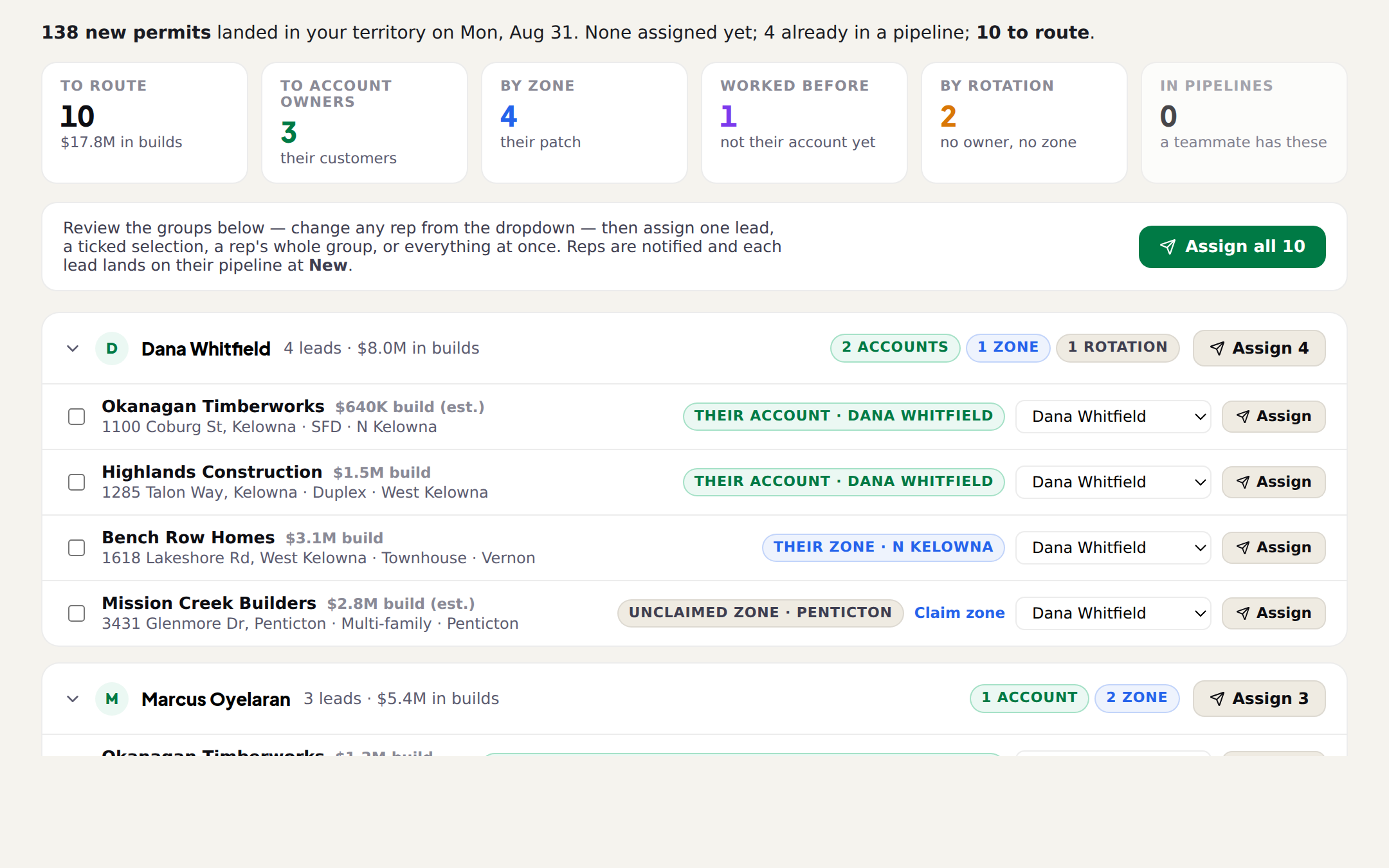
The shape of it: new permits land every Monday, each one is checked against your customer list and routed to a rep with the reason written on it, you approve the week, and every rep gets their leads on their board, in their inbox and by text with the first message drafted. They call. They tell Scout what happened in plain words. The board keeps itself current and you read it on Friday instead of asking five people.
What you get, in your terms
| What BuildMapper does | What that means for you |
|---|---|
| Every new permit in your area lands on Monday, already matched to the builder, the project type and the build's value. | Nobody exports a list, checks a city portal or forwards a PDF. The week is on the page when you open it. |
| Each permit is checked against your customer list before anything else. | A builder who already buys from you is never called cold, and the rep who owns the account is the one who gets the lead. |
| Each lead is routed to a rep, with the rule that picked them printed on the row. | You read down the page, overrule where you know better, and approve. Ten minutes, and you always know why a lead went where it went. |
| The rep gets the lead on their board, in their email, and by text with the pitch written. | Your reps do not learn a tool. They read a text and make a call, the way they already work. |
| The board moves itself when an email, a quote or a contract goes out, or when a rep texts Scout what happened. | No Friday round of "what happened this week". You are looking at the same card the rep is working, not a copy of it. |
| Leads nobody has touched in two weeks rise to the top of your page, with the rep's name on them. | You nudge the right person about the right job instead of asking everyone about everything. |
| Two reps working the same builder show up on one list. | The most expensive mistake a branch makes, caught before the second call. |
| Every won and lost job teaches next Monday's list. | The list gets better at looking like the jobs you actually take, without anyone tuning anything. |
The best week and the worst week
Be honest about the floor before you sell this to your reps. Here is the week when everyone uses everything, next to the week when a rep does the bare minimum. The point is that the bare minimum is still a better week than the one you have now.
| Moment | Best case | Worst case (the floor) |
|---|---|---|
| Monday, 8:00 | You open Team Flow, read the groups, change two reps, approve the week. Every rep has their leads by 8:15 with the reason on each. | You approve the week. That is the one step that needs a person, and it is the one step nothing can skip. |
| The rep's morning | Scout texts each rep their leads in order with a draft first message. The rep reads it, sends it from their own phone, and the card moves to Contacted on its own. | The rep ignores the text. The lead is still on their board at New, the bell and an email say it is theirs, and Scout brings it up again in the next morning message. |
| During the week | Reps text Scout quoted them 24k and won it. The board keeps up. Quotes come from your own price list in minutes. | Reps call and quote the way they always have. Scout still nudges them about a pitched lead that has not moved and about follow-ups coming due. |
| Your check-in | Performance shows who moved what. The Stale list is empty. | The Stale list names every lead untouched for two weeks and the rep holding it. You know exactly who to walk over to, and about which job. |
| Next Monday | Won jobs have taught the list, your customer file has grown, and ownership routes almost everything before you look. | Same again. The leads are still on a platter, and nobody built a spreadsheet. |
That is the floor: leads on a platter, and a nudge when one goes quiet. Everything above it is a rep choosing to type less.
Setup, in one sitting
About an hour, once. Have two things ready: your customer list (a CSV or Excel export from your ERP; account names are enough, column order does not matter) and your reps' email addresses. The price list can come later.
- 1Create the team and invite the repsSettings → Team & roles → Create team. Invite each rep by email, or share the join code with the branch. Team Flow appears in your sidebar the moment the team exists; there is nothing to install. Each rep is a seat with their own board and their own Scout.
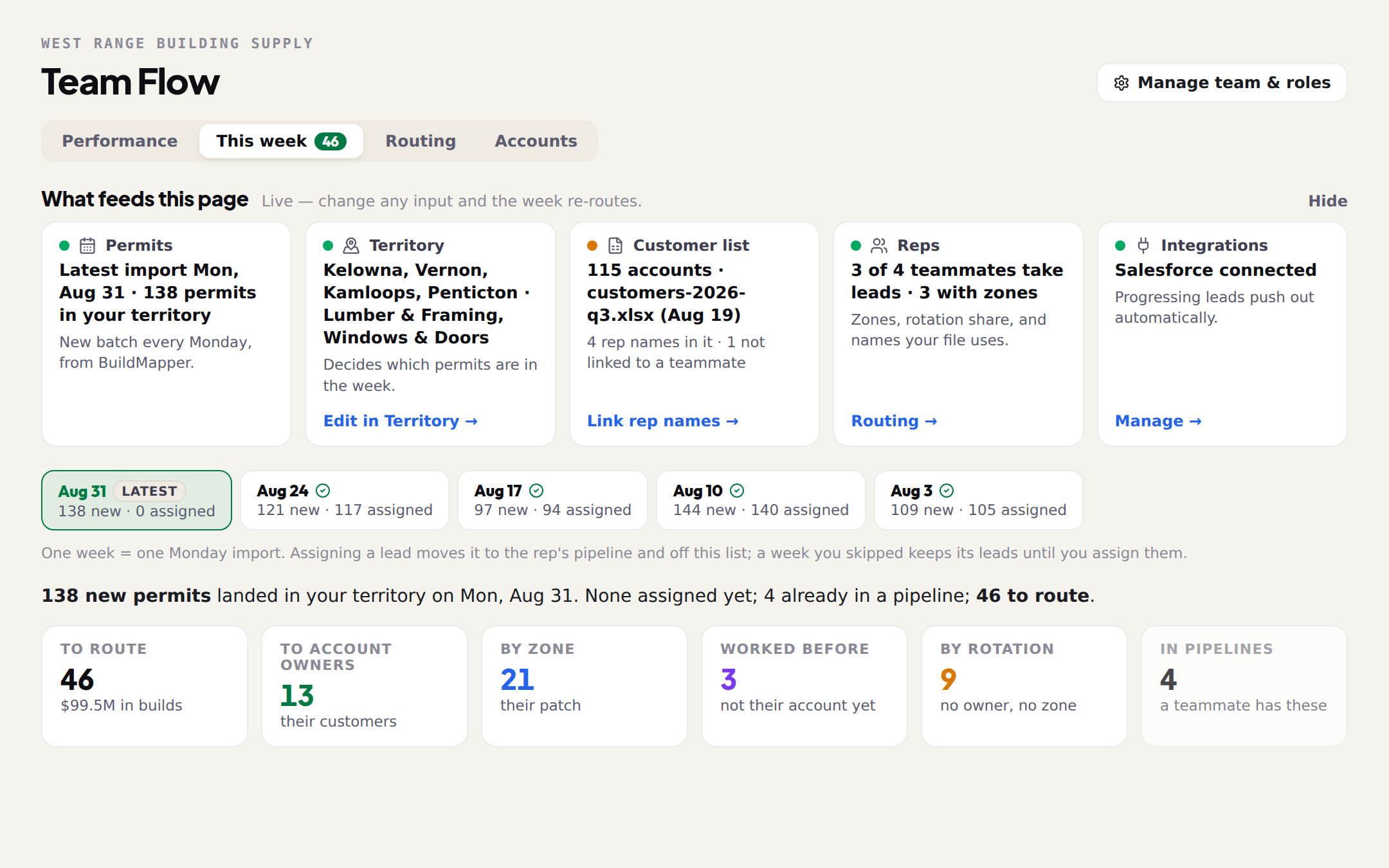
- 2Set your scopeOn the Team Flow setup screen, or later on the Routing tab: where you sell, which builds you supply, and the smallest job worth a rep's time. This is one setting for the whole branch and it decides which permits are in the week at all. Start wide; you can narrow it once you have seen a real Monday.
- 3Drop your customer listThe Customer list card on This week takes the file. Every account name is matched to the builders named on permits, and re-matched after every Monday import, so a customer who starts building shows up as yours. This is what makes the first routing rule, their account, fire. If the file has a rep column, even better.
- 4Link the rep names from your fileThe Routing tab lists every rep name it found in your file, with a Routes to dropdown. Link each one to the teammate it belongs to. This one step routes most of the week correctly on its own, because ownership beats everything else.
- 5Switch reps on and give them zonesTick Takes leads on every rep who works new leads. Give each one the zones they actually drive. Leave fit wide open unless a rep genuinely never sells into a build type; a narrow fit only pushes leads into No eligible rep.
- 6Get Scout onto their phonesEach rep opens Settings → Integrations → ScoutRep, enters their mobile number and replies CONNECT to the text. Two minutes each. Do it in the same meeting where you hand out the rep guide, so nobody is asked to do it alone later.
- 7Later: the price listDrop your price book and spec sheets on Product Brain and quotes draft from your real prices. It is the only piece that depends on your catalog, and the loop runs without it.
Your week, once it is running
| When | What you do | How long |
|---|---|---|
| Monday | Team Flow → This week. Read the groups, change a rep where you know better, Assign all. | 10 minutes |
| Monday | Accounts → Duplicate outreach risk. Two reps on one builder? Pick the owner and their leads move. | 2 minutes |
| Thursday | Performance → Stale leads. One conversation per stale lead, with the rep it names. | 5 minutes |
| Friday | Performance → By rep, and What changed this week. Who moved cards, who did not. | 5 minutes |
| Any time | Ask the page a question instead of reading the charts (below). | 1 minute |
That is the whole management overhead: under half an hour a week, and none of it is data entry. A week you skip keeps its leads until you assign them, so a holiday does not lose a batch; it just waits.
What to say to your reps
The rep's version of this process is three sentences, and the shorter you keep it the more of them will do it. Say it in the meeting, then hand them The rep's one-page guide: leads on your phone, and what to ask Scout, which has the questions worth asking Scout.
- "Your leads come to you." Monday morning, on your board and on your phone, with the reason each one is yours. Nobody is asking you to go find them.
- "Call the builder about the material, then tell Scout what happened." Left a message, quoted them 24k, won it. The board updates itself. Nobody re-types anything.
- "Scout writes the first message. You send it." From your own phone, in your own name. It never texts a builder for you.
- "If a lead goes quiet, you will hear about it before I do." Scout nudges you first. The Stale list is where I look second.
Ask the page instead of reading it
The bottom of the Performance tab is a chat over your team's numbers. It answers from the same figures the tables show, so it is a shortcut, never a different answer.
For the market rather than the people, ask Scout in the app. It reads the permits across your whole territory and your own pipeline, not your reps' boards; that is what Performance is for.
Three mistakes that quietly break the process
- Skipping the customer list. Without it the first rule never fires: every lead deals out by zone and rotation, and your own customers get called cold by whoever was next up.
- Setting fit narrow. Fit is eligibility, not relevance. A rep whose fit says "detached homes only" is skipped for everything else, and those leads sit under No eligible rep until someone notices.
- Letting weeks pile up. A skipped week keeps its leads, but nobody is calling them. Assign on Monday even if two rows are wrong; moving a card afterwards keeps its stage and notes and tells the new rep.
Where the detail lives
| Step | Read next |
|---|---|
| The whole loop, once | How a week runs on BuildMapper |
| Team, seats and roles | Seats, roles and the join code |
| Scope and the customer file | Set up your territory and load your customer file |
| Routing, zones and fit | Who gets which lead: scope, zones, fit and rotation |
| Monday's approval | Assign Monday's leads in Team Flow |
| Ownership and duplicates | Accounts: who owns which builder |
| Your Friday page | Reading the Performance tab |
| Hand this to your reps | The rep's one-page guide: leads on your phone, and what to ask Scout |
| The price list, when you get to it | Product Brain: your price list in plain English |