
Quote → Contract → Invoice → Job
One record from the first price to the last dollar. What each step carries into the next, who signs what, and the client link that never shows money.
Four apps, one chain. Each step is prefilled from the one before it, so the client's details, the scope and the amount are typed once. Quotes, Contracts, Invoices and Jobs are Pro apps; the records you create stay readable on any plan.
| Step | Starts from | Client sees | Ends with |
|---|---|---|---|
| Quote | A description or a plan set, priced from your price book | A private page: Accept, Decline, Download PDF | Accepted, and the total on the pipeline card |
| Contract | The accepted quote (scope written per that quote) | The scope, payment schedule and terms; type or draw a signature | Signed |
| Invoice | The quote, the job, the card, or the permit | How to pay, a PDF, and Pay online when Stripe is connected | Paid |
| Job | The won deal: contract value, schedule and quote lines prefill | Progress, stage, photos, and no money at all | Completed, with the margin known |
Contracts
New contract prefills from the accepted quote: client, value, design, and a scope that reads The work comprises the following, per accepted quote Q-1004. Edit the sections, set valid-until, Send for signature. The client signs on the page by typing their name or drawing with a finger, or declines with what would need to change. Status runs Draft, Out for signature, Viewed, Signed.
Invoices
New invoice from a quote (the richest source), a job, a card or a permit; a card with an accepted quote is billed automatically. Tax defaults come from your quote settings. The client page shows the invoice, your How to pay instructions (e-transfer to payments@yourcompany.ca, auto-deposit is on), and Pay online when you have connected Stripe. Mark it paid yourself when the money lands. Overdue is flagged on the dashboard.
Jobs
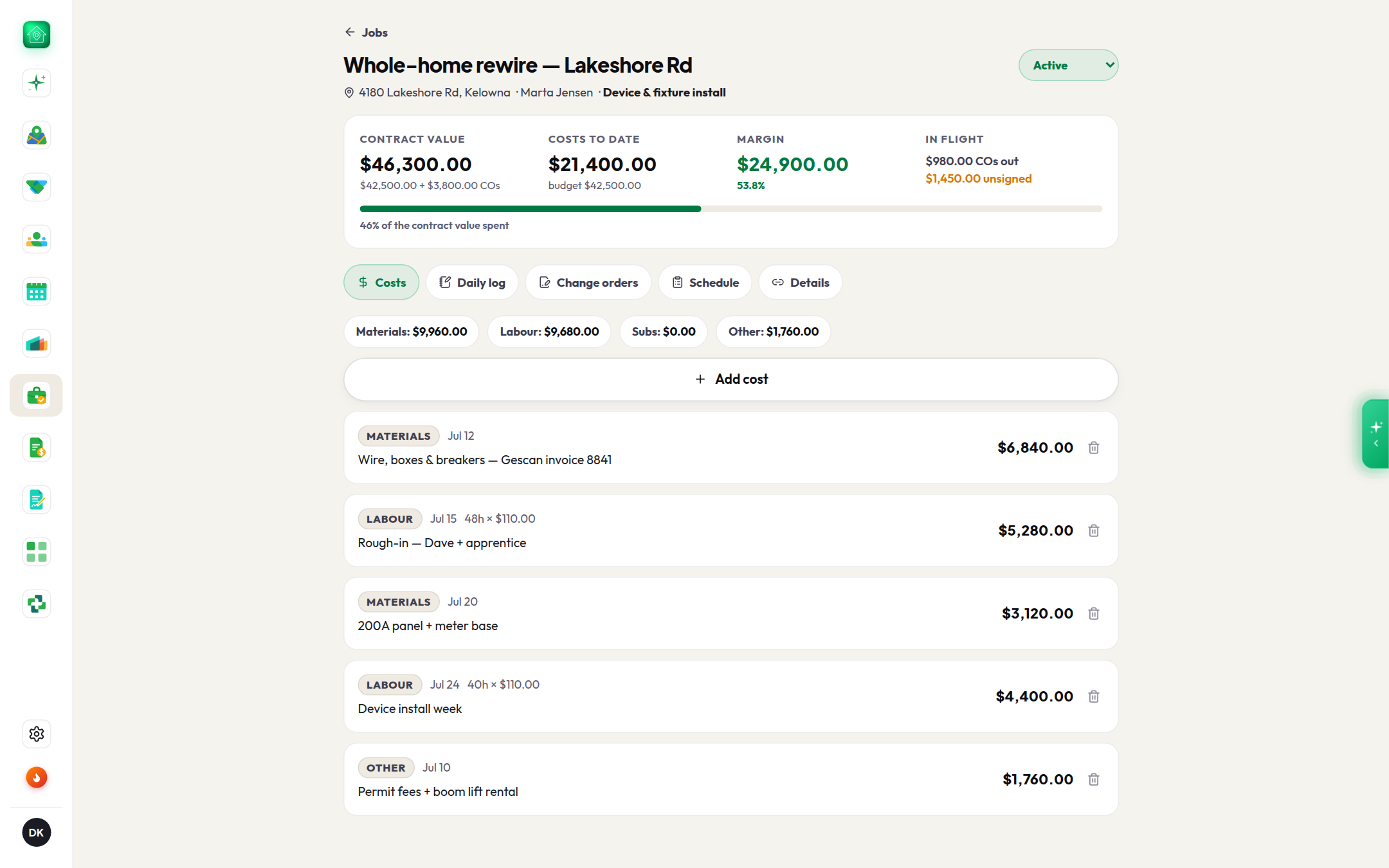
Start job from a won card or a signed contract, and the address, client, permit, contract value, payment schedule and quote lines (the budget baseline) prefill. Then the job runs from the phone: Costs (labour, materials, subcontractor, other, with a snapped receipt), Daily log, Change orders (Add pot lights in kitchen, an amount added to the contract, sent for signature and signed on the same rails as the contract), Crew (clock in, clock out, a site note, a photo; the crew view shows no costs), Punch list and Schedule. The header keeps the live margin: contract plus signed change orders, minus costs, in red when it goes negative.
Create & copy link gives the client a progress page: stage, percent complete, start date, photos. It contains no money. Nothing on it can be read as a price.